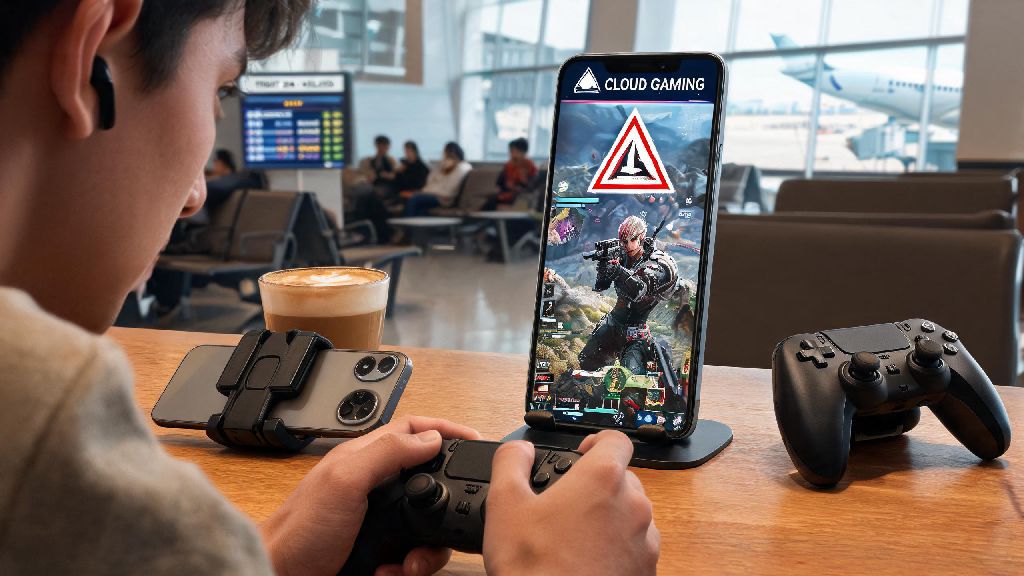
If you’ve ever been stuck waiting for a flight, on a long lunch break, or away from your gaming setup and craving a quick battle royale match, you’ve probably asked a common question: can you play apex legends on phone. There’s a lot of conflicting information online about supported versions, workarounds, and safety risks of playing Apex on mobile, so we put together this no-fluff guide to break down exactly what’s possible, what you should avoid, and how to get the best experience if you decide to play on the go.
Can You Play Apex Legends on Phone With Official Support?
The short answer is yes, though not via the dedicated native Apex Legends Mobile app that launched back in 2022. That version of the game was sunsetted in 2023 after Respawn and Electronic Arts decided to shift focus back to the core PC and console versions of the game. But that doesn’t mean you’re out of options for official mobile play.
Your best bet is to use a licensed cloud gaming service that lets you stream the full, unmodified PC or console version of Apex Legends directly to your phone. Supported services include GeForce Now, Xbox Cloud Gaming, and PlayStation Plus Cloud Streaming, all of which work on both iOS and Android devices. Since these services run the official version of the game on remote servers, you don’t have to worry about account bans, and all your progress, skins, and ranked progress are tied directly to your existing EA account. That means you can pick up right where you left off from your home setup, no extra work required.
How to Optimize Your Apex Legends Mobile Gameplay Experience
Playing Apex on your phone works best if you tweak a few settings and prep your setup before you jump into a match. The biggest factor in how smooth your experience is will be your internet connection, but small changes to your hardware and settings can make a huge difference in how playable the game feels.
First, 5G or high-speed Wi-Fi with at least 25 Mbps download speed is non-negotiable for cloud streaming, especially if you want to play at 1080p with minimal input delay. If your connection is slower, you’ll experience stutters, lag, or even dropped connections mid-fight that can cost you the match.
Next, most Bluetooth controllers are compatible with cloud streaming platforms, including official Xbox and PlayStation controllers, as well as mobile-specific attachments like the Backbone One. Touch controls are available on most services, but they have a steep learning curve and put you at a serious disadvantage against players using physical controllers, so we recommend investing in a controller if you plan to play more than a couple matches a month.
You don’t need a flagship phone to get a good experience, but you should have at least 4GB of RAM and a phone running Android 10 or iOS 15 to run the streaming apps smoothly. We also recommend turning on Do Not Disturb before you launch a match, so incoming calls or notifications don’t interrupt your gameplay.
For quick, actionable tweaks to improve your experience right away, follow these tips:
Key Differences Between Phone and Desktop Apex Legends
Even with the best setup, you’ll notice a few key differences when you play Apex Legends on phone compared to playing on a native PC or console. Most of these differences are minor for casual players, but they can have a big impact if you’re used to competitive ranked play.
First, you’ll have slightly higher input delay when playing via cloud streaming, even with a perfect internet connection. That delay usually sits between 10 and 30 milliseconds, which is barely noticeable for casual play, but you may want to avoid high-stakes ranked matches until you’ve adjusted to the lag so you don’t lose RP due to factors outside your control.
Unlike the old dedicated mobile app, the cloud streamed version of Apex is exactly the same as the core PC or console version. That means all seasonal events, new legends, weapon balancing changes, and limited-time modes are available at the same time as they launch on desktop. You’ll also be matched with the same pool of players you’d play against on your home setup, depending on whether you’re streaming the PC or console version of the game, and cross-play settings work exactly as they do normally.
The smaller screen size can make it harder to spot enemies from long range, so most mobile players adjust their FOV to be 5 to 10 points higher than they use on desktop to get a wider field of view. Also, you won’t be able to use custom mods or configs when playing via cloud streaming, since you’re accessing a pre-configured instance of the game on the service’s remote servers. That’s not a big deal for most players, but it’s worth noting if you rely on custom configs to adjust your aim assist or movement settings.
Is Playing Apex Legends on Phone Worth It for You?
Whether playing Apex on your phone is worth it depends almost entirely on what type of player you are, and what you’re looking to get out of the experience. For casual players who only log a few matches a week, it’s almost always a great option, especially if you travel often or spend a lot of time away from your home gaming setup.
Being able to play Apex Legends on phone without having to boot up your PC or carry a console with you means you can get your battle royale fix anywhere you have a solid internet connection. You don’t have to grind a separate account, all your skins and progress carry over, and you can even join parties with your friends who are playing on desktop or console just like you normally would.
For competitive players who grind ranked matches regularly, it’s a bit more of a mixed bag. It’s a great way to practice your movement, test out new legend abilities, or play casual matches with friends when you’re away from your setup, but the extra input delay and smaller screen will put you at a noticeable disadvantage against players on native PC or console. Most competitive players don’t use mobile play for ranked grinds, but it’s still a useful tool for practice when you can’t access your main setup.
One important note: you should never use unlicensed, sideloaded Apex mobile apps that claim to let you play the game for free without a cloud subscription. These apps almost always contain malware, can steal your EA account credentials, and will result in a permanent ban on your Apex account if detected by EA’s anti-cheat system. The small cost of a cloud gaming subscription is well worth avoiding those risks.
At the end of the day, if you’ve been asking whether can you play Apex Legends on phone, the answer is a clear yes, as long as you stick to official cloud streaming services and take the time to optimize your setup. It’s not a perfect replacement for playing on a native PC or console, but it’s an incredibly convenient option for casual players and a useful practice tool for competitive players who want to stay sharp even when they’re away from their main setup. Just remember to avoid unofficial third-party apps, tweak your settings to reduce lag, and don’t stress too much if you lose a few matches while you get used to the mobile experience.